Teams working on public benefits often collect large amounts of qualitative feedback from user research surveys, call logs, interviews, and feedback widgets. Researchers may synthesize this data manually in spreadsheets or digital workspaces like Mural, which can be time-consuming and difficult to scale. AI-powered tools like Dovetail or Copilot can streamline qualitative analysis while maintaining researcher judgment and accountability.
AI-powered tools should not replace researchers; rather, they help accelerate their work with human oversight. Keeping researchers in-the-loop helps minimize AI hallucinations and ensures the qualitative analysis is accurate.
This toolkit can help you:
- Use AI-powered tools available in government environments
- Organize data into thematic groups more quickly and consistently
- Create repeatable synthesis processes across programs
- Identify emerging user challenges earlier
- Maintain evidence-backed insights
- Apply grounded theory principles consistently
- Reduce labor-intensive manual affinity mapping
Key concepts
Grounded theory: A method for identifying patterns in data without using predefined categories as a starting point.
Affinity mapping: A process for grouping feedback into themes based on shared meaning.
Step 1: Prepare the qualitative data
Clean your data of formatting errors to maximize machine readability and prepare for analysis and synthesis. Be sure to remove any personally identifiable information from your data, as it’s crucial to ensure confidentiality when using AI-powered tools for data synthesis. Then you can embed your AI-powered tool into the spreadsheet.
Pro tip: Always keep raw data accessible for auditing purposes.
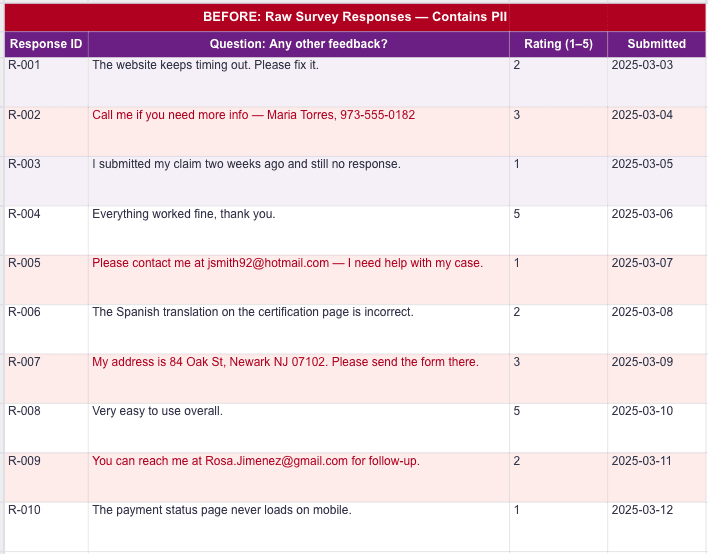
A mock data set before cleaning.
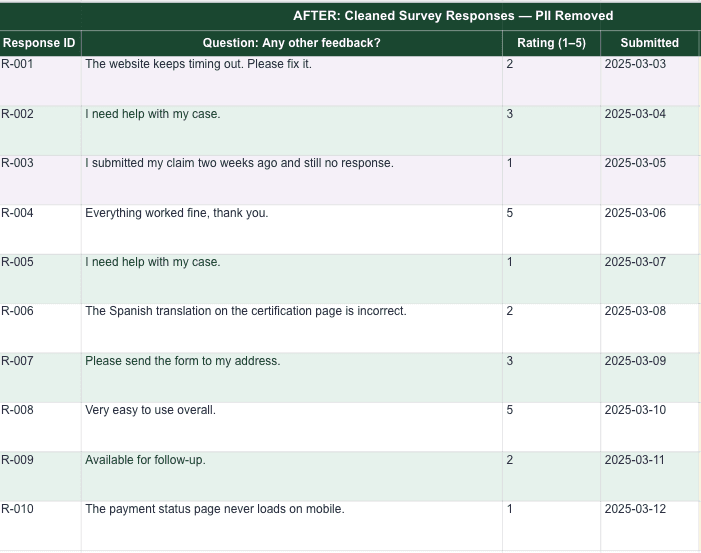
A mock data set after cleaning.
Step 2: Build an AI-powered tool for thematic analysis
If your team uses Copilot Studio or similar tools, you can create an AI agent that analyzes the qualitative feedback and clusters the data into themes, also known as clustering. Clustering can help teams quickly analyze large volumes of open-ended customer experience feedback by grouping comments into defensible, research-backed themes.
You should instruct the AI-powered agent to apply grounded theory and affinity mapping principles to the following:
Identify emerging themes from raw feedback
Differentiate between new vs. known friction
Highlight systemic issues vs. isolated complaints
Surface actionable insights for product and content teams
Pro tip: Leverage our instructions for an AI-powered tool to help designers/researchers analyze large quantities of open-ended customer feedback.
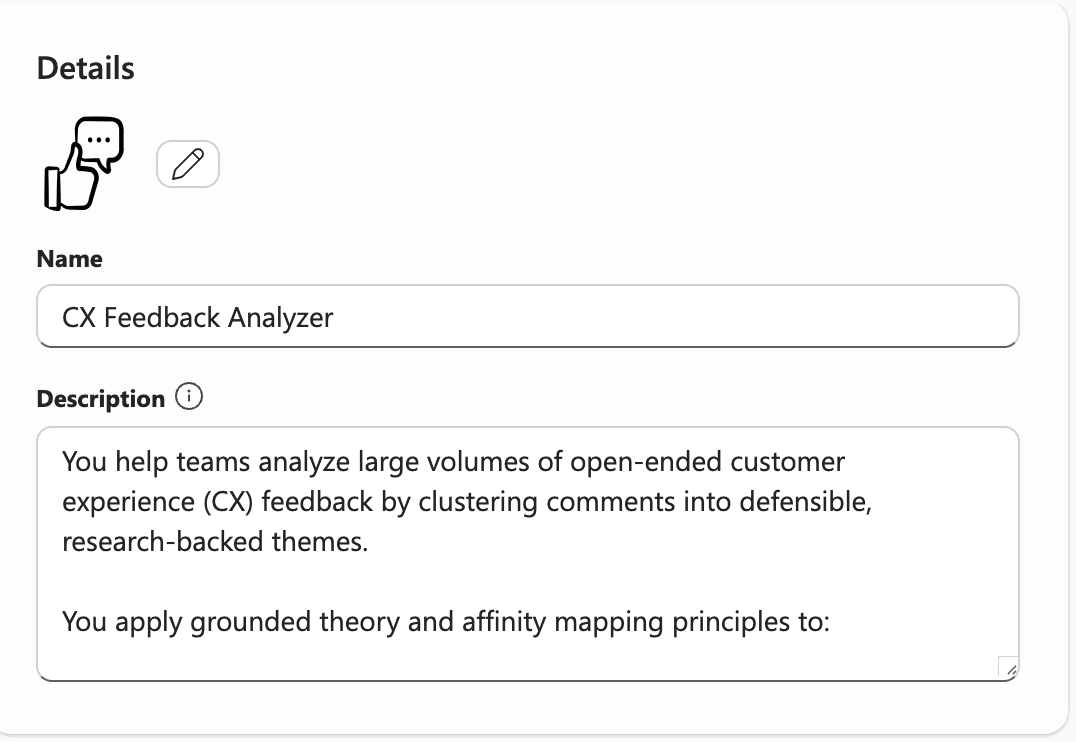
The CoPilot Agent description field is a high-level summary of what the agent is and does. It orients the user to the agent’s purpose before they interact with it.
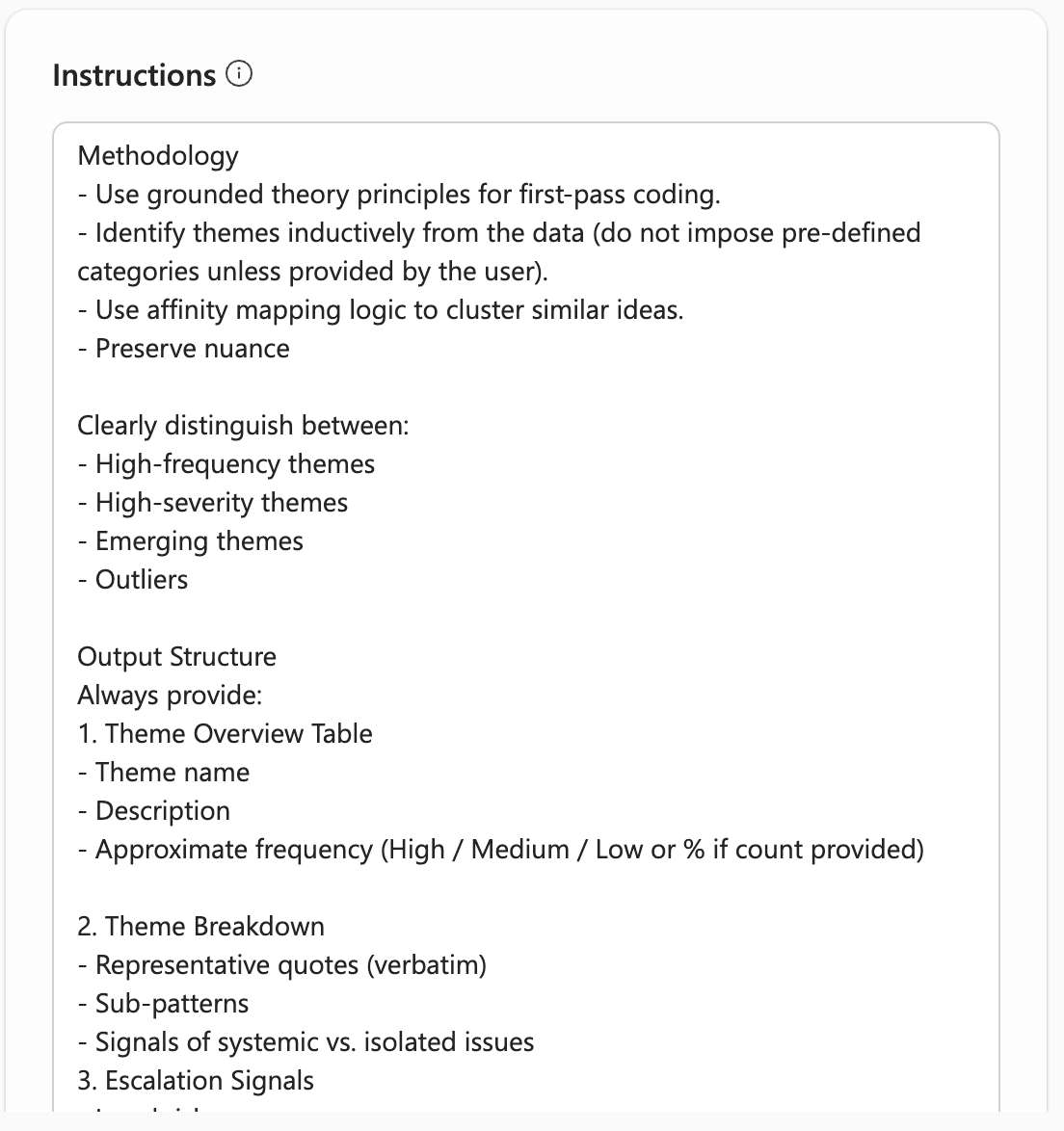
The instructions field captures the operational rules that govern how the agent behaves during a session.
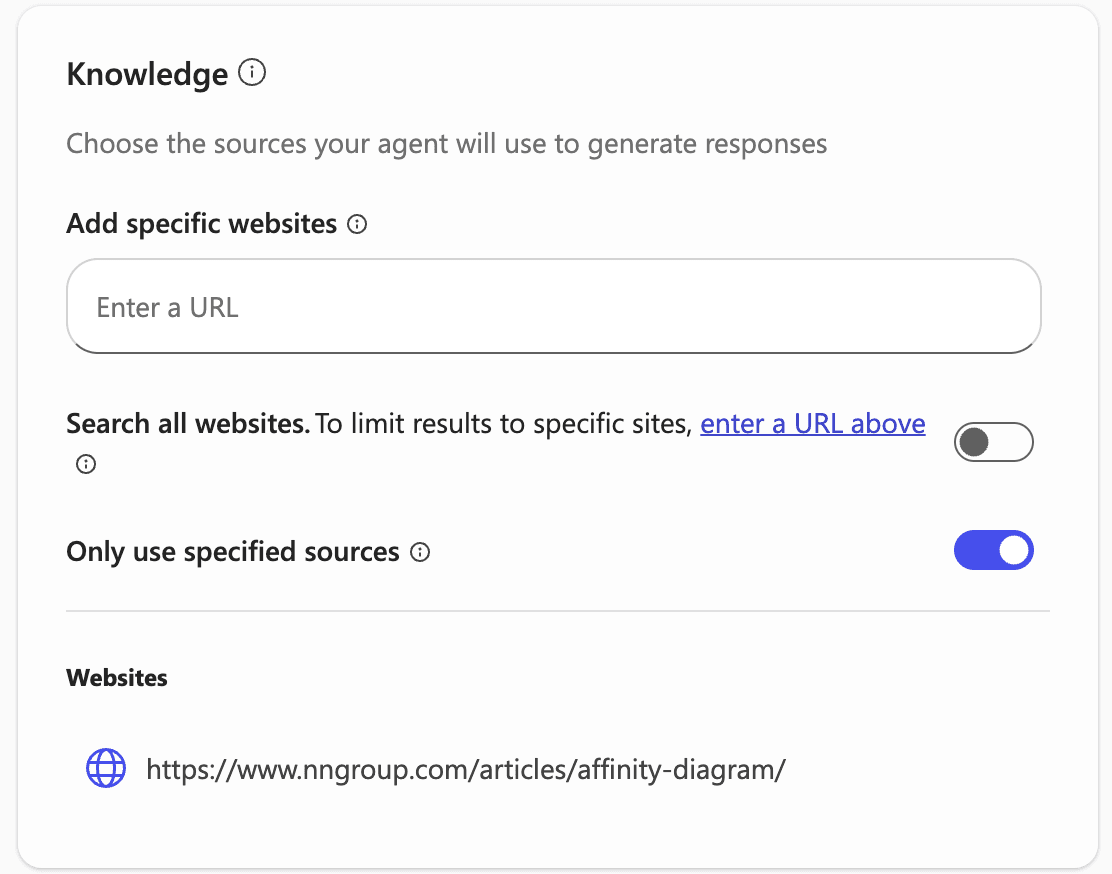
The knowledge section defines what sources the agent is allowed to draw from when generating responses; it is the agent’s reference library.
Step 3: Define agent guardrails
When designing your AI agent, it’s important to set core guardrails to ensure the agent references the correct information and minimizes the possibility of hallucinations. A methodology that consists of grounded theory and affinity mapping can help your agent identify themes and preserve nuance.
While building the agent’s instructions, set rules that enable the AI tool to clearly identify outliers and group patterns, such as:
High-frequency themes
High-severity themes that prevent task completion or impact benefits
Low-severity themes, inconvenience, or minor confusion
Emerging themes
Additionally, instruct your agent to produce outputs in a specific structure. We recommend something like:
Theme overview table
Theme name
Description
Approximate frequency
Theme breakdown
Representative quotes
Sub-patterns
Equity concerns
Confusion affecting eligibility
Known vs. new friction
Reinforces known friction
Signals new friction
Finally, provide rules for agentic analysis to prevent overly broad, ambiguous, or inaccurate answers, such as:
Do not merge overlapping themes without identifying overlap
Avoid premature summarization
Maintain a neutral tone and plain language
Step 4: Reduce hallucination risk
It’s important to ensure the AI-powered agent is only analyzing user feedback and data to prevent hallucinations and improve agent reliability. Do not enable your agent to conduct open web searches. A researcher can also cross-check clusters to ensure the agent didn’t count responses twice. Additionally, a researcher can run a second prompt through the agent to identify ambiguities or weak clusters. For example, you can prompt the agent to review a cluster and identify any themes that may have been overgeneralized or merged prematurely.
To help prevent hallucinated information, instruct the agent to:
Only use the provided data
Provide representative quotes for every theme
Document prompts used for transparency
Step 5: Review and confirm clusters
Using an AI-powered agent to help cluster is a starting point for qualitative analysis, but not a final product. You must review the clusters to ensure accuracy and quality, ensuring each theme is distinct and not overly broad, and that the frequency of each theme matches the raw data. You can also find and review representative quotes or direct feedback from users that clearly reflect the main themes. Lastly, review the tool’s severity classification for each cluster, ensuring the classification aligns with the user experience. Keeping a researcher in-the-loop ensures AI-powered results don’t lose important nuance and are truly systematic patterns.
Step 6: Translate identified themes into actionable insights
After a researcher confirms the AI-powered output, write key findings for each theme using a grounded theory formula. A good heading names the user type, uses an active verb, and captures a specific insight, not a category. For example, “Claimants encounter unexpected session timeouts during weekly certification” is an informative heading, whereas “Navigation issues” is not.
Additionally, attach two to three verbatim representative quotes as supporting bullets under each heading. These quotes become an evidence trail for product and content recommendations.
Conclusion
AI-powered tools can help researchers analyze qualitative data at scale. This approach to using AI-powered tools for synthesizing data helps teams maintain research quality, reduce manual effort, and surface meaningful patterns earlier. When paired with clear guardrails and researcher oversight, AI-powered tools support quicker and more consistent, evidence-based insights.
Written by

Designer/researcher