When a client walks into a Goodwill Workforce Advancement office, they’re often dealing with more than a job search. They might need rental assistance, food support, child care, transportation, and career training at the same time. The case managers who help them navigate these needs carry a significant mental load: remembering which programs exist, which are currently available, and how a client can actually access each one.
Nava Labs partnered with Goodwill to build a Generative AI-powered referral generator that helps case managers quickly find and share the right resources for each client’s situation. The tool has recently been piloted with case managers at Goodwill Central Texas and Goodwill Keystone Area in Pennsylvania.
Scattered knowledge, limited tools
Goodwill’s Workforce Advancement program takes a holistic approach to helping people find stable employment. Case managers don’t just match clients with job postings — they connect them with training programs, financial assistance, food banks, legal services, and more. This means juggling a wide menu of resources: internal Goodwill programs like the Career Advancement Training classes, government benefits like SNAP and Medicaid, community organizations, and job listings that change daily.

Goodwill case managers collect information about clients’ needs so that they can match them with resources.
Before this tool, case managers relied on a patchwork of methods to find and share these resources — each with key limitations:
Web search for services in the area, which can be slow and miss Goodwill’s internal programs
ChatGPT, which can lack organizational context and produce inconsistent results
Resource aggregators like FindHelp and 211, which have the most trusted info but inflexible search tools
Printed resource binders or personal memory, institutional knowledge that can walk out the door with staff turnover
“People have barriers to employment. So we want to mitigate those barriers as much as possible. But knowing which resources exist across internal programs, government benefits, and community organizations requires a depth of knowledge that takes years to build.”
Eugene Edwards, Director of Workforce Advancement at Goodwill Central Texas, who began his career as a case manager 14 years ago
What the tool does
The Referral Generator has two core outputs: tailored resource referrals and action plans.
1. Tailored resource referrals: A case manager can enter their client’s needs — say, medical assistant training, interview clothes, and diapers — along with a location. The tool then searches across Goodwill’s internal programs, government resources, and community organizations to generate a list of relevant resources to refer people to. Each result includes a description rewritten for the specific context. For example, if the client mentioned transportation challenges or a particular neighborhood, that information shapes what’s surfaced and how it’s described.
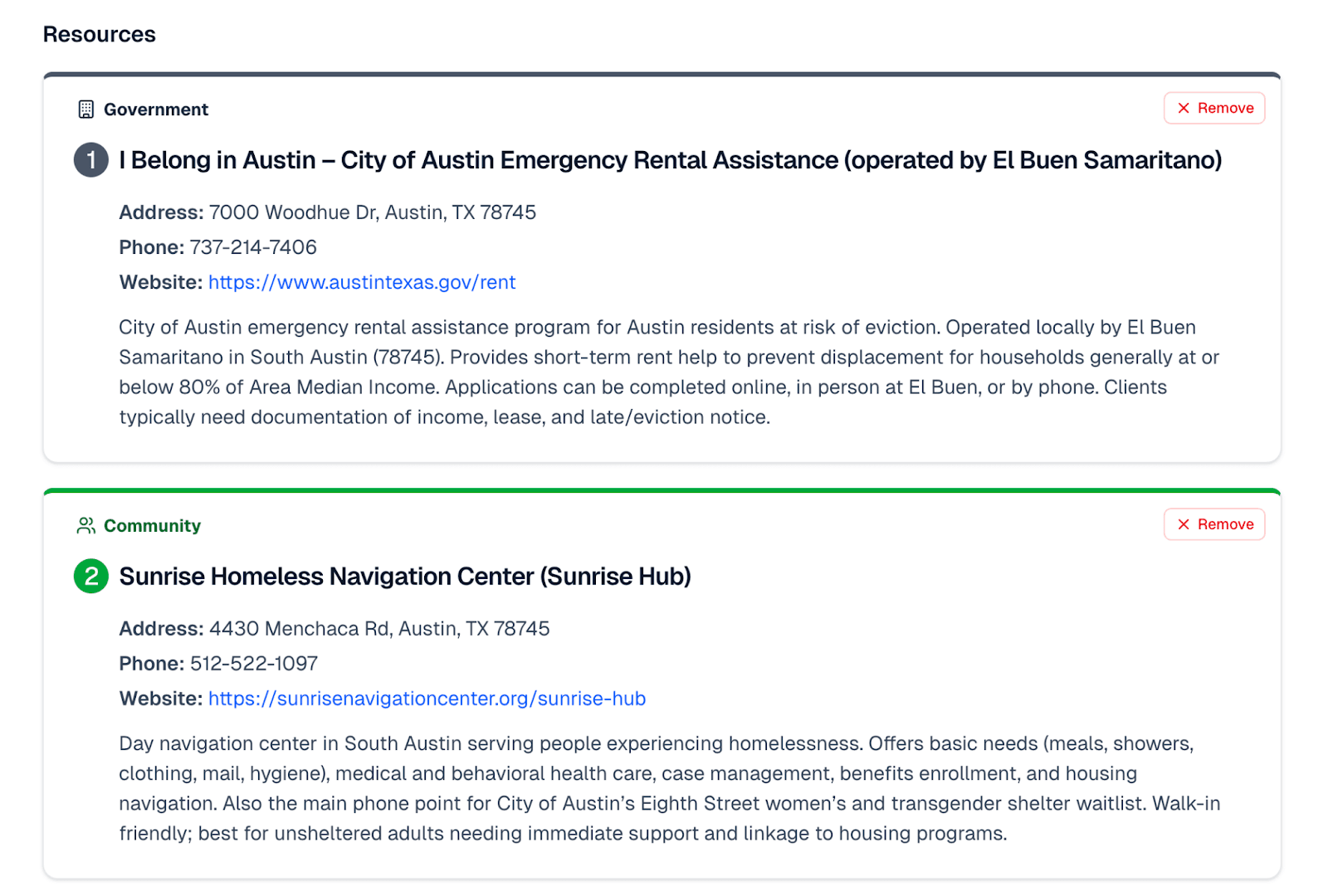
A screenshot of some of the government and community resources that the Referral Generator pulled up for rental assistance in Austin, Texas.
The interface is designed to avoid the “blank prompt box” problem. Instead of a single text field, it offers structured inputs, like:
A description of what the client needs
A location field that accepts zip codes, city names, or even landmarks
Category filters for different types of needs
Toggles to show only Goodwill programs or only external resources
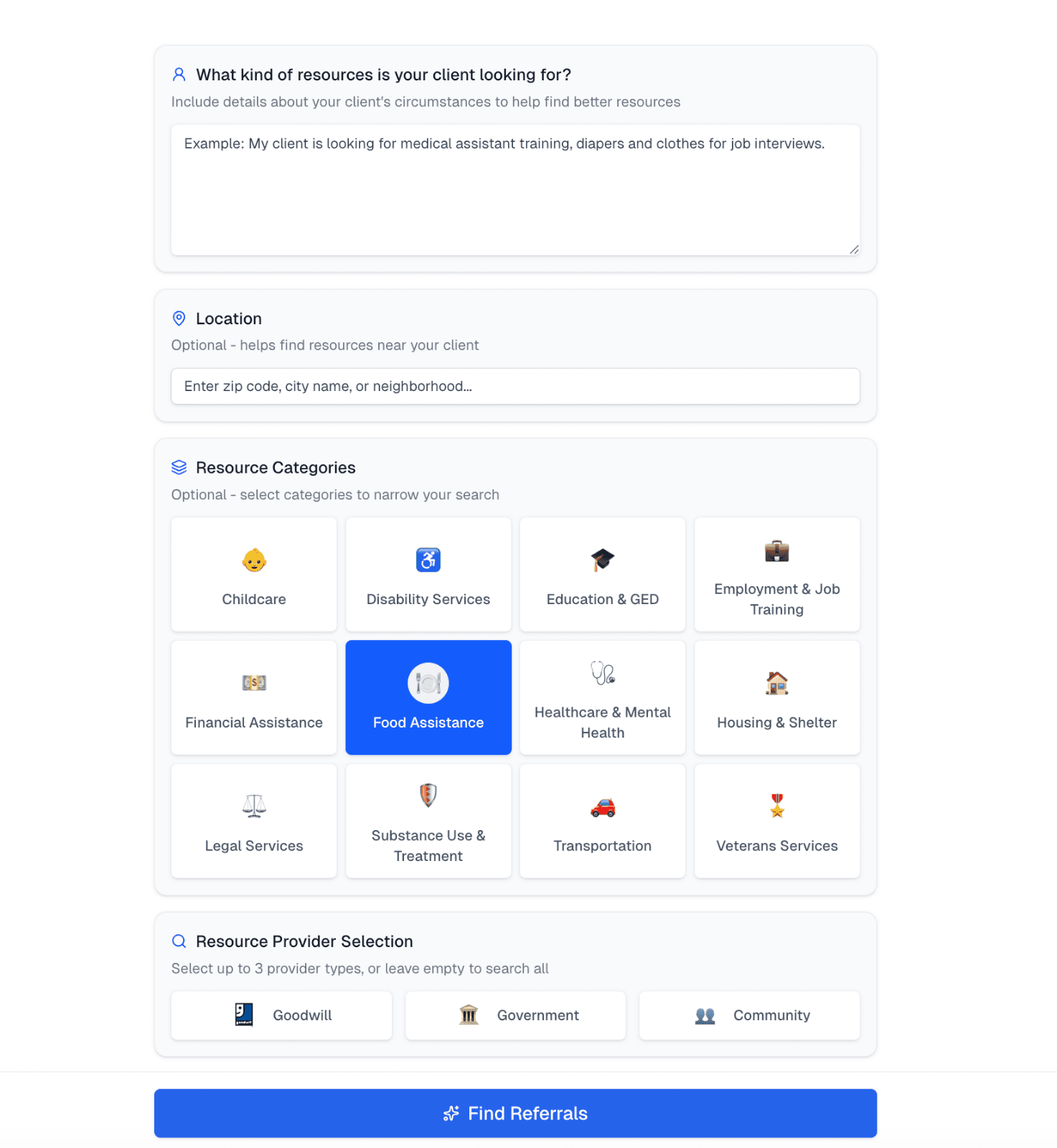
A screenshot of some of the filters that case managers can use when entering information about a client’s needs into the tool.
2. Action plans: Once a case manager identifies the most relevant resources, they can use the tool to generate action plans, or step-by-step guides for how people can access each resource. An action plan for emergency rental assistance, for example, would include how to apply, what documents to gather, the expected timeline, and key tips like “apply as early as possible between the 1st and 7th each month” and “check your email and phone often so you don’t miss document requests.”
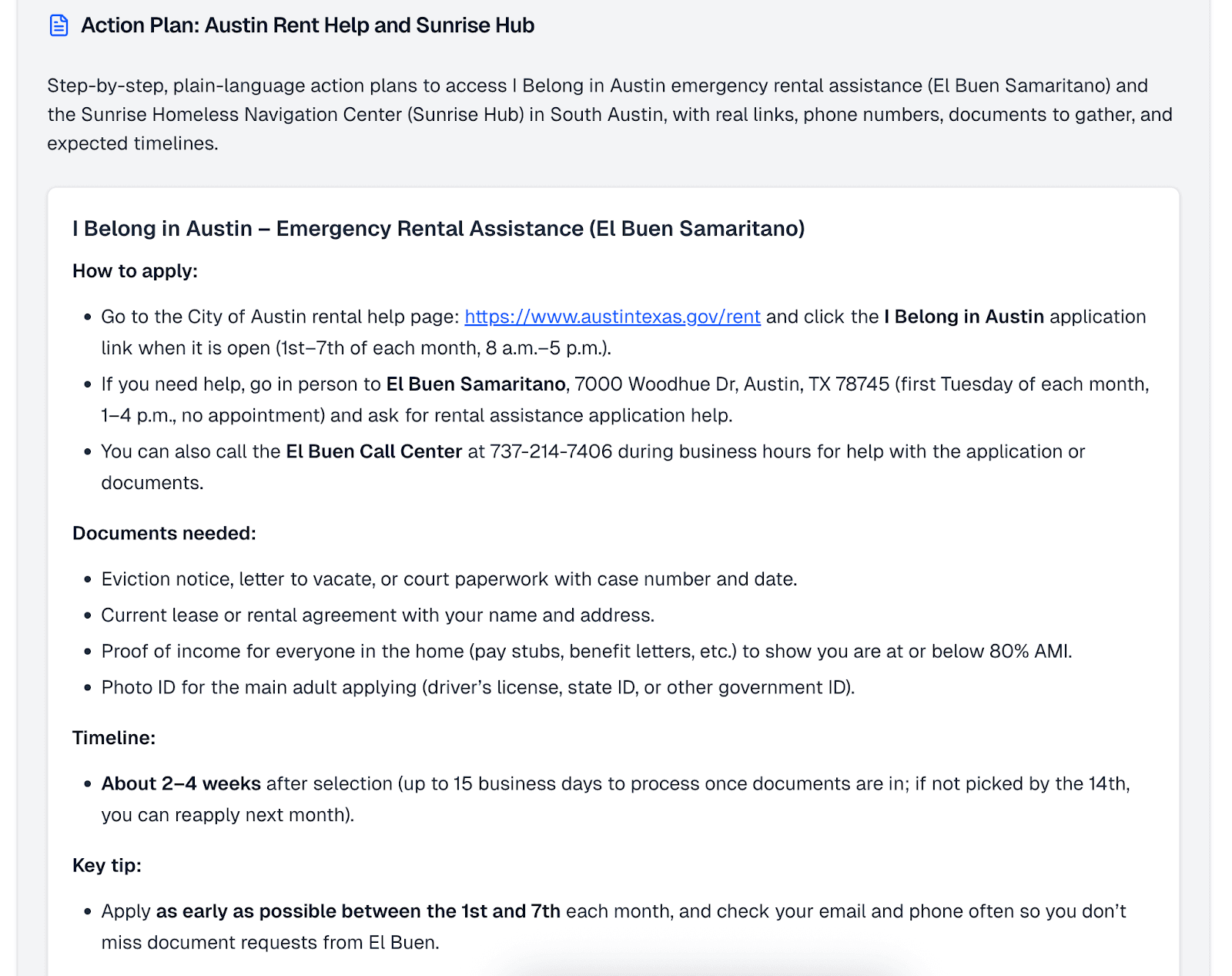
A screenshot of an action plan generated by the tool for rental assistance in Austin, Texas.
These action plans are where the tool moves beyond what a Google search or a resource directory can offer. The AI-powered tool synthesizes information from multiple sources into plain-language guidance tailored to the client’s situation and puts it in one place rather than requiring visits to three or four different websites.
Case managers can then email or print the action plans to share directly with clients, completing the loop from search to referral to handoff.
Here’s a demo of the Referral Generator:
Combining web search with curated knowledge
The Referral Generator combines GenAI with web search and a curated knowledge base. For external resources, the tool can search the open web in real time, giving it the flexibility to find local, current results without requiring a pre-built database of every resource in every city. For internal Goodwill programs, the team maintains a set of structured documents like the Career and Technical Academy class schedule, program descriptions, job postings that the tool references alongside web results.
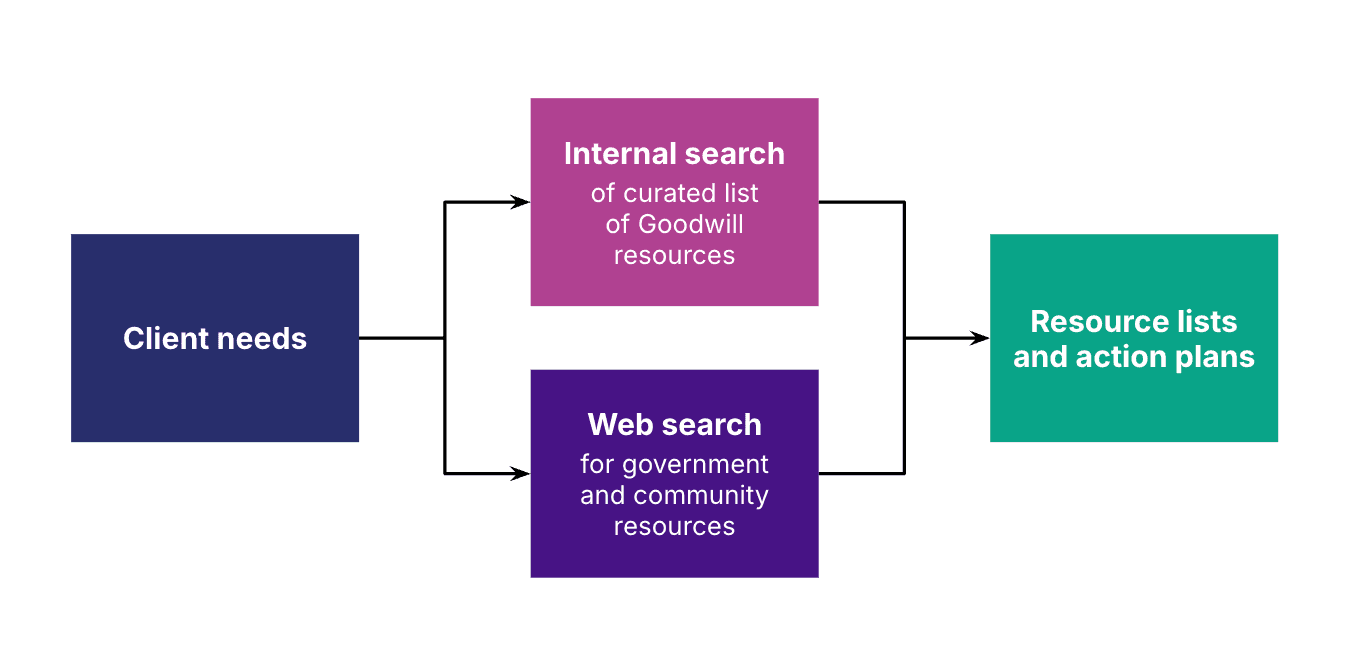
This hybrid approach is key to making the tool more useful than off-the-shelf AI-powered tools. A general-purpose chatbot doesn’t know about Goodwill’s internal budgeting class or that the food bank near East Austin is appointment-only. The curated knowledge base fills those gaps, while web search keeps external resources current. Additionally, the tool pulls regularly updated information from trusted sources like Goodwill’s job postings, which update daily.
Early learnings from the pilot
The pilot launched in November 2025 with case managers at Goodwill Central Texas, with a phased rollout to Goodwill Keystone Area in Pennsylvania to test how the tool transfers across regions. While formal evaluation results are forthcoming, some early patterns have emerged.
It saves time. “To me, it saves me a lot of time […] and it saves clients a lot of time,” one case manager said. “I can just type in what I’m looking for. The results come in. I can pass that on. […] Being able to kind of tailor your search to get the resources that you need for your clients [...] saves a lot of time.”
It’s especially valuable for newer staff. Edwards highlighted onboarding as a major use case: “Something like this accelerates [new employee] knowledge really quickly. [...] So this really helps bring and onboard people much faster so they can serve their clients from day one.”
It needs to fit into existing workflows. One of the clearest lessons is that the tool needs to feel like a natural part of the case manager’s day, not an extra step. Staff shared they have to remember the tool exists, decide it’s appropriate for the client scenario, navigate to it outside their usual case management system, get results, and then separately document what was shared. Our team is exploring deeper integration — like automatically generating case notes from referrals — to reduce that friction.
AI and web search are useful, but they don’t replace knowledge management. Web search gives the tool flexibility and freshness, but it can’t replace the curated, trusted resources that case managers rely on. The team provides the tool with structured context documents — internal program details, class schedules, trusted resource lists — in addition to web search results. Maintaining and updating that knowledge base is ongoing work, and the team is exploring ways for Goodwill staff to contribute directly, such as a shared spreadsheet where case managers can add seasonal or hard-to-find resources.
Veteran case managers can be harder to win over. While new staff see immediate value, experienced case managers already have established routines and trusted resource lists. Overcoming that requires demonstrating clear efficiency gains over their existing methods.
Keeping a human in the loop
While there’s interest in eventually exploring client-facing applications, a deliberate design choice runs through this project: the tool is built for case managers, not for clients directly.
Case managers can verify that resources are accurate and appropriate before sharing them. They provide a feedback loop to the team about what’s working and what’s missing. This approach avoids the risks of surfacing potentially inaccurate information directly to people in vulnerable situations.
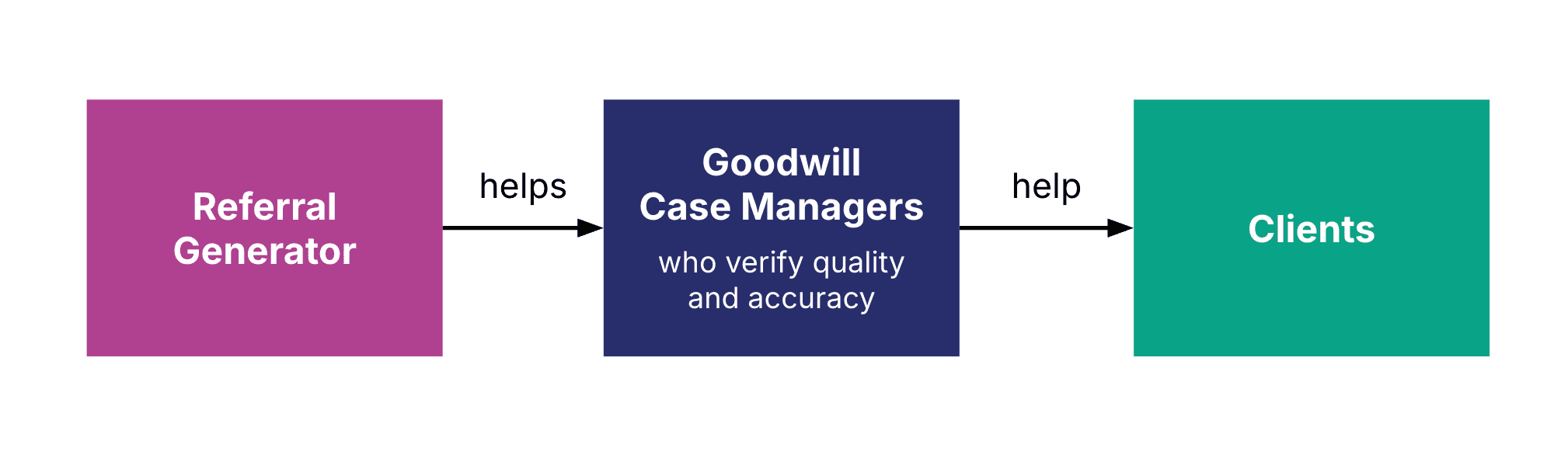
We made the choice to focus on the caseworker or staff perspective so we can keep an expert in the loop. We’re prioritizing safe, caseworker-driven interactions for project work right now.
Scaling from two locations to many
A core goal of the project is understanding what it takes to scale a GenAI-powered tool like this beyond a single pilot site. Moving from Goodwill Central Texas to Goodwill Keystone Area in Pennsylvania was the first test.
Some aspects transferred easily. Because the tool uses web search, it can find local resources in any geography with just a location input. But other pieces required adaptation: the default location had to change, internal Goodwill resources differ between affiliates, and each region has its own set of government programs and community organizations.
“To go at the national scale or just beyond Goodwill, I think the trickiness there would be you have to have a resource folder that would have lots and lots of resources across the country. And the biggest issue to think about there would be the speed — when you’re setting up a retrieval system at that scale, it might start slowing down the responses.”
Brandon Canniff, the project’s product manager at Nava Labs
The team is also working with Goodwill International as an advisory partner to explore what a nationwide rollout might look like — from the technical architecture needed to parse local resources efficiently to the organizational processes for maintaining trusted resource lists across hundreds of affiliates.
What’s next
The Goodwill Central Texas and Keystone Area pilots recently wrapped up, with analysis and evaluation findings expected soon. Consistent with the project’s open source approach, the team plans to publish results and lessons learned openly, with code available on GitHub.
Meanwhile, conversations are underway with Goodwill about transition plans: what it would look like for the tool to continue operating beyond the pilot period, and what organizational support and technical infrastructure would be needed to sustain it.
Edwards’ vision for where this could go extends well beyond resource referrals: “If we could get to a place where we’re eliminating a lot of the administrative components of their work, they can spend a lot more time with the human element.”
We aim to do precisely that. The Referral Generator is one element of Nava Labs’ Caseworker Empowerment Toolkit, a comprehensive suite of tools to help staff streamline administrative tasks in every step of their jobs — empowering them to focus on the families they’re serving.
For an in-depth demo and discussion, check out the video recording of our most recent demo day. The Referral Generator is open source at github.com/navapbc/labs-referral-tool. For more on Nava Labs projects, visit navapbc.com/labs or contact labs@navapbc.com.
Written by

Senior Designer and Researcher