Impact statistics
67% of caseworkers reported they trust the Form-Filling Assistant most of the time or all of the time
0 privacy or security incidents during the six-month pilot
Summary
Nava Labs developed an AI-powered tool to help caseworkers fill out benefit applications on behalf of the families they serve. The Form-Filling Assistant is an open source tool and built in partnership with the Riverside County Children and Families Commission and Amplifi, with evaluation supported by Georgetown’s Better Government Lab.
Security and privacy protections are paramount because this work involves sensitive and personal information. We built security into every layer of the system, from the model that processes the data to the interface caseworkers use to review the form before submitting. Below is the framework we followed when developing the tool to ensure personal data is protected and secure.
Personal data is processed, never retained
The Form-Filling Assistant uses Claude Sonnet 4.6, a large language model (LLM) developed by Anthropic, routed through Google Cloud Gemini Enterprise, Google’s LLM management platform. This routing ensures there’s no data retention; the model only reads client data, like their name, date of birth, or Social Security Number, momentarily as it fills out a field. Neither the model developer (Anthropic), nor its provider (Google), retains a copy of the client record or trains its systems on that data.
Each session is isolated and contained
The Form-Filling Assistant operates in a web browser in the cloud, not locally through the caseworker’s computer. Each session with the tool starts a Chrome web browser session through Kernel, a cloud browser provider that’s certified under SOC 2 Type II, an independent standard that verifies there are strong controls in place to keep data secure. Kernel runs the sessions in isolated virtual machines. The separate computing environments don’t share memory or storage with one another, ensuring that private client data won’t leak into other sessions.
The Form-Filling Assistant provides two connections each session. One connection gives the tool control of the browser through Playwright, a browser automation tool that uses Chrome’s DevTools Protocol (CDP) to click, type, and navigate. The second connection is embedded in the chat interface so the caseworker can watch the same session in real time.
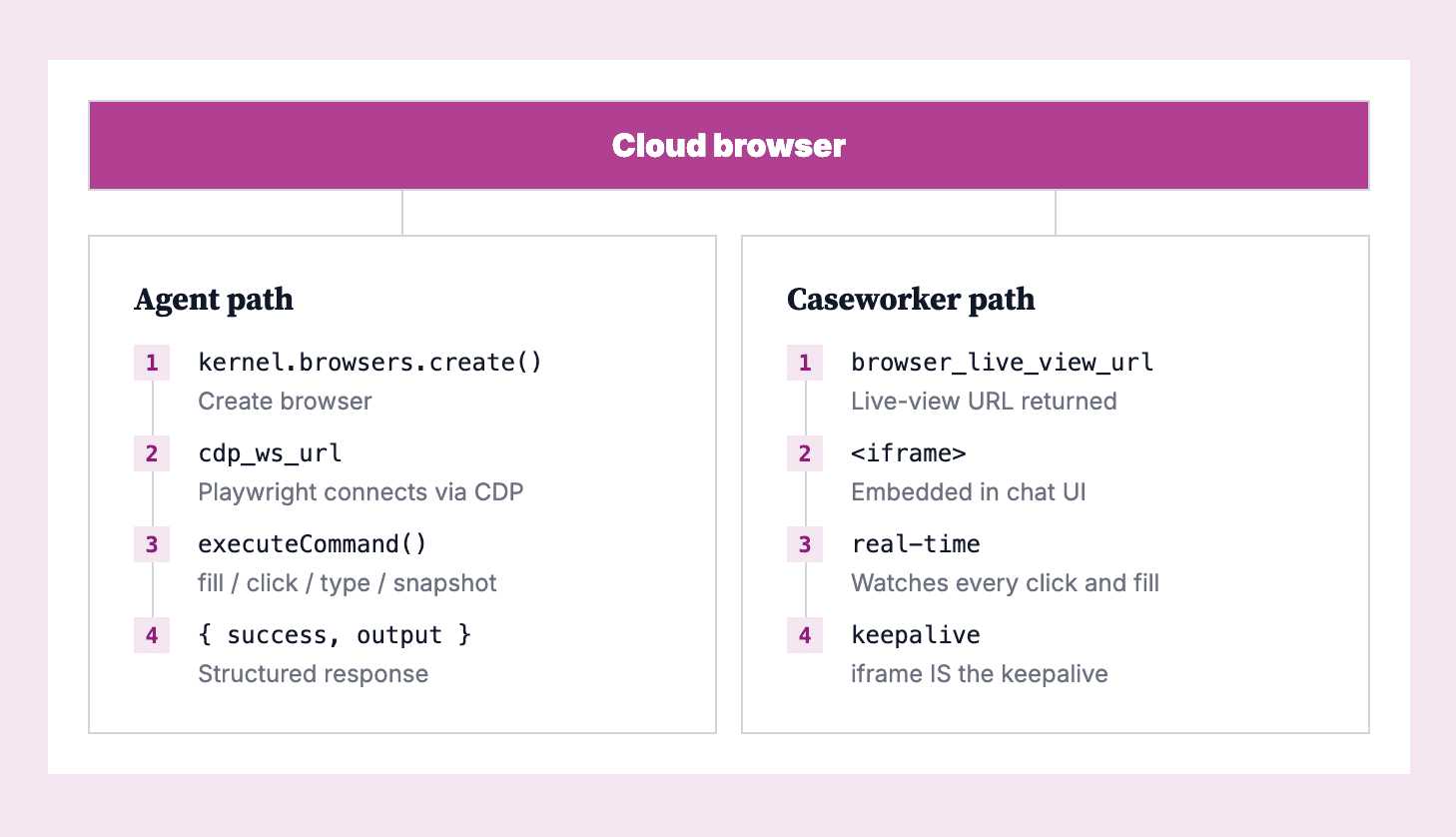
The cloud browser architecture. The agent controls the browser via Playwright and Chrome DevTools Protocol (CDP), while the caseworker watches the same session through a live-view iframe.
Infrastructure meets the standard for sensitive government data
The Form-Filling Assistant runs on Google Cloud Platform, the web application operates on Cloud Run, and the database uses Cloud SQL. This entire environment operates within FedRAMP High infrastructure, the federal government’s standard for cloud systems that handle the most sensitive, unclassified government data. Client records, application code, and the connections between services in the Form-Filling Assistant all follow that standard, ensuring the tool can operate in a sensitive environment.
Caseworkers stay in control throughout the session
The Form-Filling Assistant can handle repetitive tasks, but never acts without caseworker oversight. Caseworkers watch live the same browser session that the tool is working in and can take over at any point. When a caseworker clicks the “take control” button, the system immediately stops the AI-powered tool and any in-process actions. When they click the “give back control” button, the tool takes a screenshot of the browser to see any changes the caseworker made and continues where the caseworker left off.
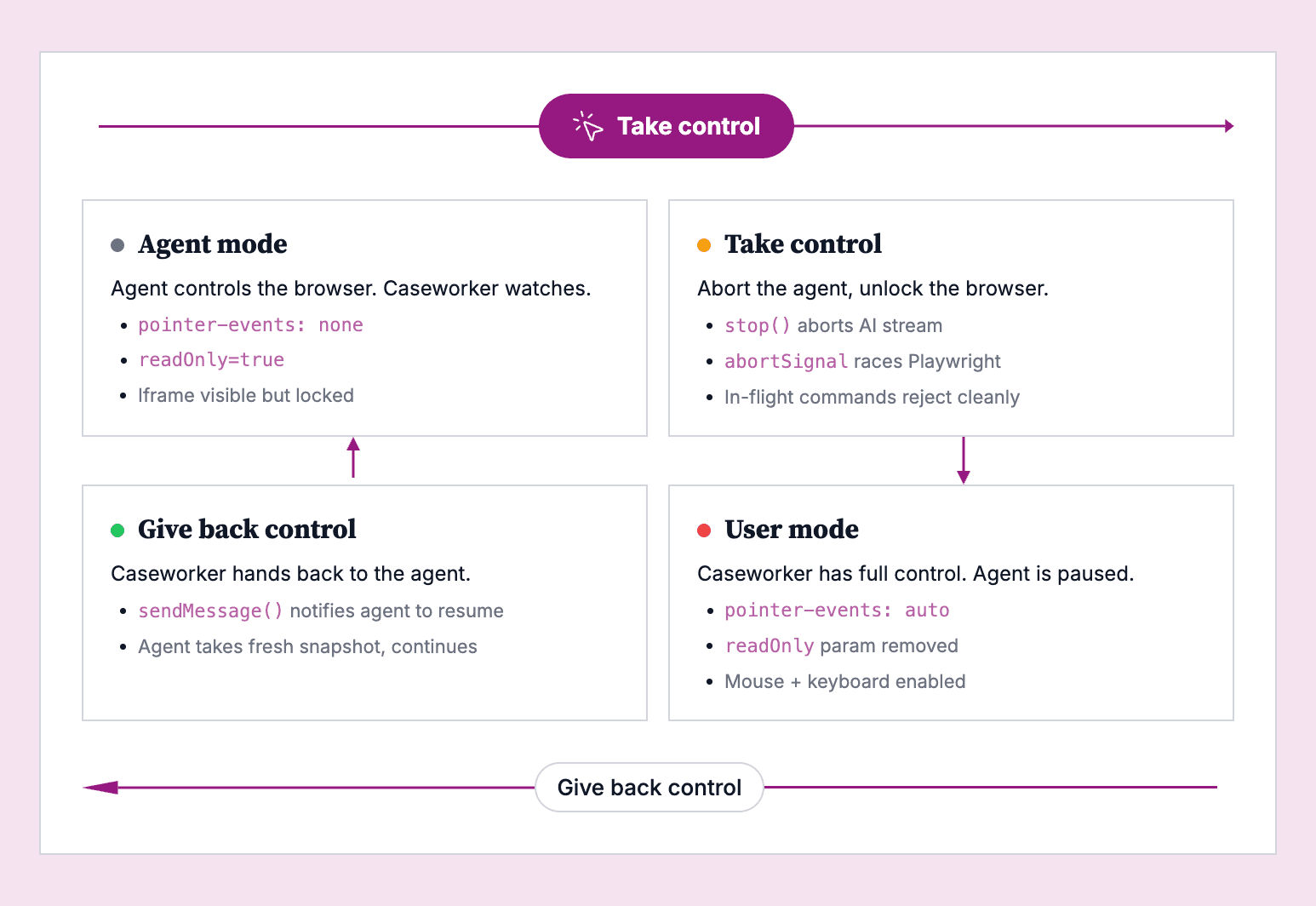
Caseworkers can take control of the browser at any point, directly make changes, and pass operations back to the AI-powered tool to continue, as many times as needed.
Submission requires a caseworker.
The Form-Filling Assistant can fill out forms but cannot submit them. Nava Labs programmed safeguards to ensure no single failure could result in an unauthorized submission. The tool’s foundational prompts explicitly instructing the AI-powered tool to never click submit buttons. When it finishes filling out an application, the tool creates a form summary for the caseworker to review.
Caseworkers receive a review card showing every entry and its source before they submit a client’s application. For example, the review card labels entries pulled from the connected case management system with that system as the source and uses “manual” for fields the caseworker entered during the session. Entries where the AI-powered tool inferred the information are labeled as “auto-filled” with an explanation of how the tool arrived at that outcome. Caseworkers can directly edit any field in the review card without using the take control button.
Conclusion
When developing the Form-Filling Assistant, we heard from caseworkers that clients would trust the tool with their personal data because they trust their caseworker’s recommendations. That trust is why families agree to try the tool at all, underscoring the importance of protecting their data.
We built in multiple layers of security to ensure their protection. Some of those layers came from the providers we used to build the tool: Claude processes client data without storing it or training on it, Google Cloud Gemini Enterprise hosts the tool without routing data to outside servers, Kernel runs each session in its own isolated browser environment, and Google Cloud's FedRAMP High infrastructure holds the application to the federal government’s standard for sensitive data. Each provider also has its own certifications and audits.
In addition, we added our own layers of security like system prompt instructions that prevent the tool from submitting an application, an interface design that lets the caseworker take control, and a review card that traces every field back to its source. This combination of both external certifications and internal guardrails provides caseworkers with the assurance that their client’s data is protected.
For more see: Toolkit: How to adapt agentic AI for caseworkers
Questions? Contact us at labs@navapbc.com or learn more at navapbc.com/labs.
Written by

Senior Designer/Researcher