The automation of routine, time-intensive tasks isn’t new to the technology industry or government service delivery. Robotic process automation (RPA), software that follows predefined scripts to perform automated tasks, was adopted across a number of government agencies years ago to complete menial tasks, freeing up staff time for more complex problems. Agentic AI takes this one step further; these AI-powered systems can make decisions within a set scope, interact with other systems, and adapt to variation in inputs and sources.
Agentic AI is best applied as assistive tools for people, not meant to replace them. At Nava Labs, we learned that AI agents could support caseworkers with repetitive form-filling tasks so we designed a Form-Filling Assistant tool to pilot with caseworkers at the Riverside County Children & Families Commission in California.
A video demonstration of Nava Labs’ form-filling assistant with narration.
Typically when a caseworker helps someone apply for public benefits, they have to manually input the person’s information into the application. We designed an AI-powered agent that can automatically pull existing data from their case management system and fill out the application for the casework to review. While the AI agent automatically fills the application, the caseworker has more time to talk to their client, possibly uncovering more needs and connecting them to resources. This interpersonal work is integral to case management and should never be automated.
We wrote this guide as a starting point for teams exploring agentic AI in a real setting like government services. This is not a guide for technical implementation. Instead, it focuses on the decisions that come before implementation: what problem to choose, how to scope the AI agent, and how to evaluate its usefulness.
See also: Toolkit: How to adapt agentic AI for caseworkers
This toolkit can help you:
- Identify the right problems for agentic AI
- Adapt your discovery process for agentic work
- Define a clear role, scope, and ideal outcomes for your AI agent
- Consider built-in skills and guardrails for the AI agent
Step 1: Define the problem you want to solve
A common mistake teams make when building AI-powered tools is starting with the technology instead of the problem. We recommend finding a clear, bounded need and evaluate if this technology is the right solution.
Start with the right kind of problem
Like any automation effort, agentic AI works best in multi-step workflows that span multiple systems. Where it differs from traditional automation is in how it handles variation. Agentic systems can adapt when inputs or pathways aren’t perfectly predictable. This variability makes an agentic system less brittle than RPA, but it also means the system will not behave as predictably as traditional automation. If a process is fully deterministic and repetitive, tools like RPA might be a better fit.
In our project, for example, supporting caseworkers with application workflows involves pulling data from a case management system and interacting with multiple forms that have variation in data fields and logic. Ideally, we would also scale to dozens and then hundreds of forms across the country.
Pro tip: Review this checklist to determine if agentic AI is the right fit for your project.
Step 2: Adapt your discovery process for agentic work
The fundamentals of discovery, or the process of investigating and documenting how an existing system works before building or replacing anything, don’t change for agentic projects: map the workflow (you can use this guide for creating a service blueprint), talk to your users, and understand the technical systems involved. However, what’s different is the set of considerations to look for and add to your existing research process.
Find recurring tasks with low judgment
Parts of a workflow that are high in frequency but don’t require human judgment are the best candidates for automation. In our work with Riverside County, caseworkers were asking clients for the same personal information multiple times because their systems weren't connected.
Identify what shouldn’t be automated
Look for moments in a workflow that rely on human connection and judgment: Where does someone need to listen, draw on their expertise, or be directly accountable to the person in front of them? In the Riverside County project, we didn’t enable the AI agent to submit the application even though it's technically possible. That final step belongs to the caseworker and their client to preserve trust and accountability.
Assess technical constraints
Identify available application programming interfaces (APIs) and integrations early, because available data shapes what the AI agent can do. In Riverside County, the case management system had an existing API that covered basic demographic data, but it wasn't exhaustive. Understanding that early helped us design the prototype around APIs that access existing data. After all, an agentic system is only as useful as the data it can reliably reach.
Step 3: Define the AI agent’s role and capabilities
You can get more precise about the role the AI agent should play once the problem you are trying to solve is clear. To accomplish this, you need to develop a system prompt for the AI agent. The system prompt includes instructions but also a clear definition of the AI agent’s role. Here are some guidelines to follow when drafting a system prompt:
Treat the AI agent like a new employee
Write your prompt as if you’re onboarding a new team member. A strong AI agent definition includes:
Role: What is this AI agent responsible for?
Goals: What outcomes should it optimize for?
Anti-goals: What should it explicitly not do?
Available tools: What systems and tool calls can it interact with?
Define constraints clearly
Constraints establish what the tool should not do. These guardrails help prevent foreseeable mistakes and keep people in charge of important decision making moments.
In our project, we determined that the AI agent would not be able to determine an applicant’s eligibility for any program. A caseworker has to complete this step. We did enable the AI agent to flag potential inconsistencies or risks to eligibility and notify the caseworkers to take actions (e.g., “Are you sure this 70+ year old man is eligible for pregnancy-related support?”). Finally, we established that the AI agent could draft an application but that a caseworker must submit it.
Define the rubric before you build
Write down how you will grade the AI agent’s performance like a teacher before you start building. What steps will you evaluate? What is a “pass” versus a “fail”? This becomes the foundation for your evaluation rubric to use later in testing and will also help your team determine a shared understanding of what success looks like.
Step 4: Equip the AI agent with tools and safeguards
An AI agent without integrated tools is just a chatbot. Tools allow an AI agent to take action on a person’s behalf. Tools are integrated with the AI agent enabling it to do things like retrieve data, perform actions on a website, and follow instructions. Tools are what let the AI agent participate in a workflow rather than just talk about it.
In our project, we experimented with tools in Mastra’s framework, including a component called the agent-browser, which gives the AI agent its own web browser to work in. Using these approaches enabled us to simplify the system prompt instructions and keep it more focused. As our product encounters more complexity, we have relied on this approach more and more.
Build oversight into the workflow
Go back to your service blueprint and identify where manual verification is required. These moments will vary in scope; some might be as simple as a “yes/no” confirmation, others could involve reviewing and correcting multiple fields before moving forward. In our project, caseworker oversight moments included:
Reviewing missing client information before the AI agent starts to fill out an application
Confirming or correcting information at key points during the process
Stopping, pausing, or taking over entirely at any point
Establishing a design for checkpoints depends on the stakes of the moment. Referencing your service blueprint can help you determine which steps are higher-stakes and warrant more thorough review, and which ones might only need a quick confirmation. That will guide how much you ask of the person reviewing.
Safeguards for when things go wrong
Even with oversight patterns built into the tool, you should anticipate that things can go wrong. Hallucinations and mistakes are inherent in generative AI.
When the AI agent is handling demographic data, it can be challenging to spot mistakes because the output might seem logical at first. For example, our Form-Filling Assistant initially saw that a client had a mailing address on file and responded to “Homeless? Yes/No” with “No.” Caseworkers flagged that as an inaccurate assumption. Since then, regular conversations with caseworkers about how they handle nuances in household scenarios have helped us ensure the AI agent’s actions mirror their existing process.
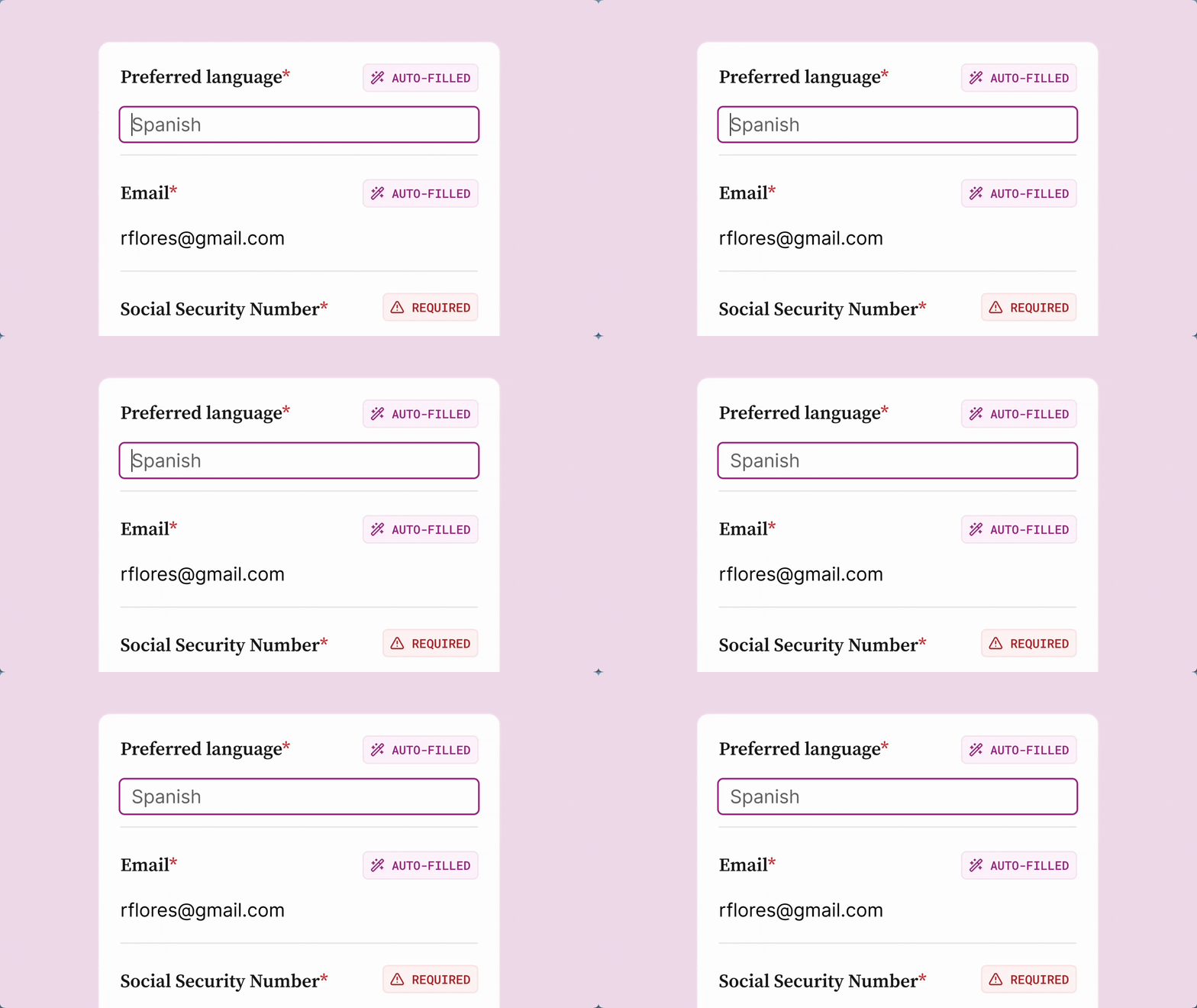
In our Form-Filling Assistant, every field stays editable, including the ones the AI agent auto-fills. Here, a caseworker clicks into the preferred language field to correct the AI agent’s guess.
We used two design choices to help surface these uncertainties during a caseworker’s review. First we distinguished when the AI agent pulled directly from source data and then where it made an inference. We made those fields editable so caseworkers can correct mistakes without disrupting the workflow.
Conclusion
A strong agentic tool has clear defined roles and responsibilities for the person using it and the AI agent. Those roles will shift throughout an interaction, from active partner to hands-off reviewer, but those shifts can be communicated throughout the interaction.
In Riverside County, confidence in the agentic tool came down to two things: understanding what the AI agent would and wouldn't do, and staying in control throughout. Ultimately, this technology can help a caseworker spend less time on paperwork and more time with the family who needs their help.
For more, see: Toolkit: How to adapt agentic AI for caseworkers
Written by

Product Manager

Senior Designer/Researcher